Trade Assistant MT5 is an order-entry and position-management utility, not a standalone strategy that decides which market to buy or sell. It helps translate an operator’s entry, stop and risk choice into an order, then offers management functions such as partial closing and several trailing methods. Its value is best evaluated through calculation accuracy, execution workflow and control behaviour rather than by asking for a universal profit curve.
Position sizing starts with the stop and risk base
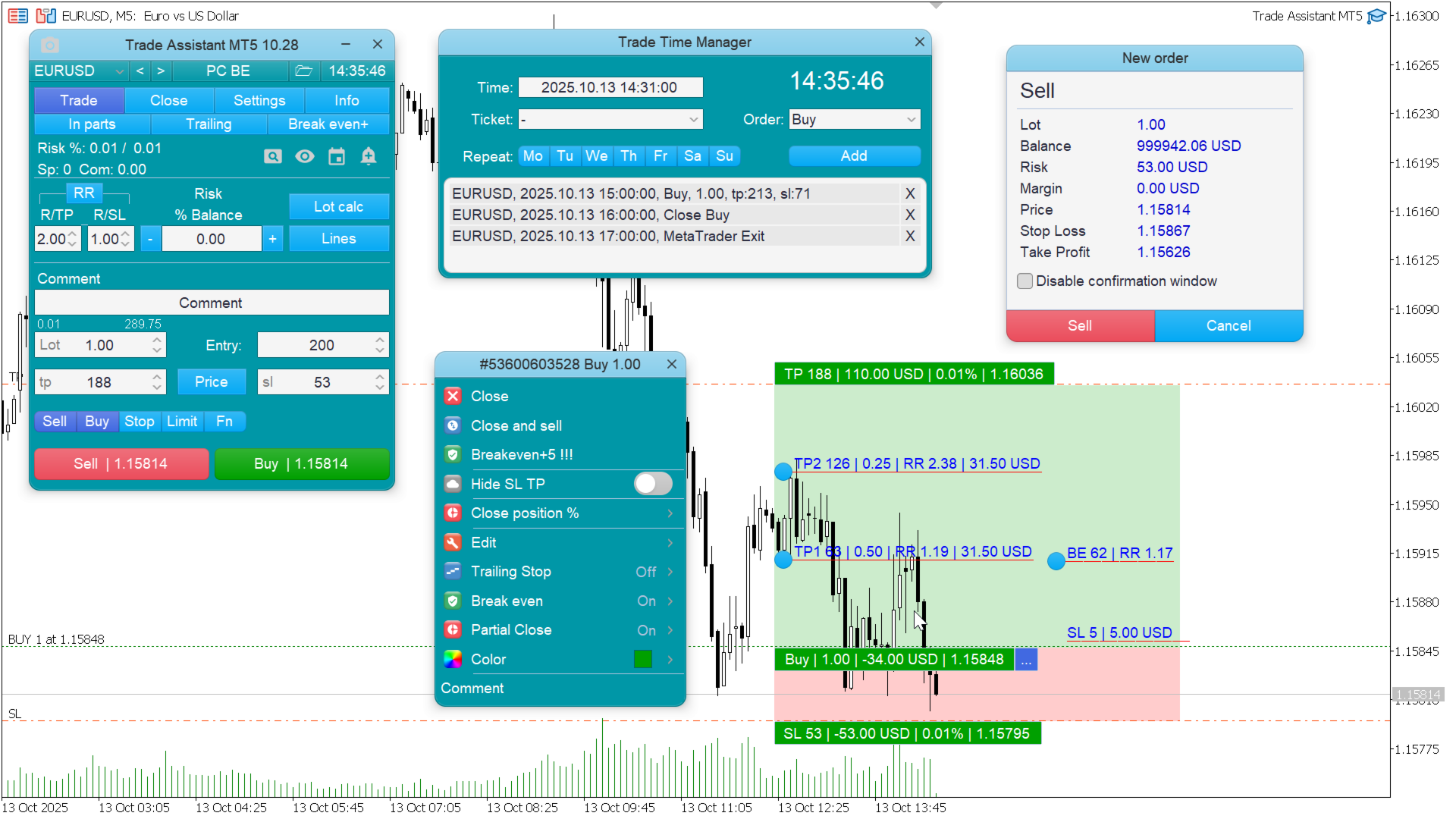
The publisher describes risk expressed in money or as a percentage of several account measures, including balance, equity and free margin. These are not interchangeable. Equity changes with floating positions, while a custom amount can differ from the account total. Check which base is active, how the symbol’s tick value is handled and how the result rounds to an allowed lot step. Moving a stop line should prompt a fresh review of both volume and monetary exposure before order submission.
Management tools can interact
The utility supports partial closes, break-even, multiple trailing modes, timed actions and linked pending-order cancellation. Combining these controls can produce a different sequence from using each individually. Test the priority when two conditions become true on the same tick. With a small initial volume, a requested partial close may also conflict with the broker’s minimum lot increment. An expected reduction that cannot be submitted should be visible in the terminal log and management display.
Virtual controls require an operational distinction
Hidden stops and virtual pending orders are software instructions rather than the same thing as orders already accepted by the broker. Their behaviour depends on the running terminal and tool configuration. Inspect what protection remains if the application disconnects. The linked publisher installation, usage and demo-trial guides are the appropriate starting points for reproducing the workflow. A utility that makes an order easier to enter does not validate the market decision behind that order.
Installation guide: verify both trading permissions
The author’s installation page distinguishes the EA’s own algorithmic-trading permission from the terminal-wide Algo Trading switch. Both affect whether requested actions can execute. It also describes loading colour presets as a presentation change. After installation, test an intended action on demo and inspect the Experts log if it is refused. A panel that appears correctly on the chart is not sufficient evidence that order permissions, prices and the broker’s contract rules permit the request.
Before installation
Settings and setup requirements
These notes summarize the publisher material reviewed for Trade Assistant MT5. Check the original manual and current release before configuring an account.
Primary function
Manual order preparation and automated management
Sizing inputs
Risk amount or percentage plus the selected stop distance
Publisher documentation
Installation, application instructions and a demo-account trial guide
Publisher price at review
100 USD. Confirm current purchase and rental terms on MQL5.
No direct public MQL5 account was identified in the reviewed listing. For a utility, evaluate the advertised workflow, permissions, connections and failure handling. A trading account return would not by itself verify that these functions work.
What to assess before choosing Trade Assistant MT5
Confirm the selected risk denominator before every configuration comparison.
Test management-rule interactions rather than isolated buttons only.
Use the publisher demo route to assess workflow without assuming a full free licence.
Third-party product research, not YO4X trading results. Past results do not establish future returns.
Publisher material
Trade Assistant MT5 images
Original publisher material. Embedded figures may describe a simulation or an earlier account snapshot; this is not a YO4X result.Original source ↗
Try before choosing
Trade Assistant MT5: licence and demonstration options
Trading utilities may depend on live messages, chart interaction or external connections that a historical tester cannot reproduce. Check the original listing for a demonstration, video or rental option. Any publisher-offered trial must be checked for duration, demo-account limits and required connections; this guide does not verify a free unrestricted version.
For Trade Assistant MT5, use the setup notes above to identify what the tester can demonstrate and what still requires a supported account, data source or publisher guidance. Read MQL5’s product-testing rules ↗
Explore YO4X
Free local access. Clear product terms.
YO4X offers free local access to its supported strategy catalogue through the Windows app on supported MT5 demo accounts. This research page does not confirm that Trade Assistant MT5 is included or compatible.
A free full-product licence is not confirmed here for Trade Assistant MT5. Check the publisher’s current purchase, rental or tester options on MQL5. YO4X does not distribute the publisher’s EX5 file from this page.
Ask support about current app availability before choosing a strategy. Arbitrary EX5 uploads are not supported; cloud execution and brokerage costs are separate.
Does Trade Assistant generate profitable trade ideas?
Its documented purpose is execution assistance and position management. The trader still supplies the trade decision and appropriate settings. Evaluation should focus on whether the requested risk, order type and management action are applied correctly, rather than treating the panel as a self-contained forecasting strategy.
How should I test a partial-close rule?
Use a demo position whose size supports the broker’s allowed volume increments. Record the requested percentage, actual closed volume and remaining position. Then test the interaction with trailing and break-even settings so the order of operations is understood before relying on the combination.
Sources and editorial notes
Source review: 17 September 2026. This guide draws on the official product listing, 3 linked publisher guidance references. A link does not mean we have reviewed the file contents. Where reviewed, the guide summarizes them with attribution.
YO4X Research is the site’s editorial attribution, not a certification or a named independent tester. We have not installed or forward-tested this product for this guide. Publisher claims, screenshots and source-account statistics do not establish that the current version reproduces those results. Artwork belongs to its original publisher.