Swing Forge Gold is a swing-breakout EA using pending stop entries and multiple named trading zones. The public description enumerates eight zones, although one heading calls them seven. This inconsistency is worth resolving with the current version and manual. The publisher also describes initial protective stops, early failed-breakout exits and account-level guards. Each control should be assessed by its actual action rather than a general safety claim.
Crest, Anvil, Ridge, Spark, Forge, Crown, Flint and Ember are the eight names listed in the captured description. Their swing depth, session schedules and offsets can differ. Confirm which are active in the selected preset and identify their orders when reviewing results. A zone count is not a measure of independent risk: several may trigger during the same Gold move. Compare simultaneous exposure and drawdown overlap rather than assuming separate names imply diversification.
A fakeout exit trades one risk for another
The publisher describes closing stalled breakouts before the full stop is reached. That can reduce some losses, but can also close a position before a later continuation. Review both outcomes and the costs of repeated attempts. Spread-adjusted break-even and trailing levels should be checked on the actual broker, including two- and three-digit Gold contracts. A displayed protective level remains subject to execution conditions; it should not be represented as a guaranteed maximum loss.
Prop-oriented controls do not replace rule checks
The description includes minimum holding time and daily/equity guards, while also noting that zones are not optimised for prop firms. Preserve that qualification. A minimum-duration setting can interact with an early fakeout exit, so ask how the current version resolves competing instructions. The linked signals span several brokers; compare them individually with settings and account dates. A vendor-tested broker environment is useful context, not assurance that a different account will reproduce the same fills.
Before installation
Settings and setup requirements
These notes summarize the publisher material reviewed for Swing Forge Gold EA. Check the original manual and current release before configuring an account.
Eight named zones are listed despite a seven-zone heading
Publisher price at review
249 USD. Confirm current purchase and rental terms on MQL5.
Source evidence
Signals, profit and drawdown
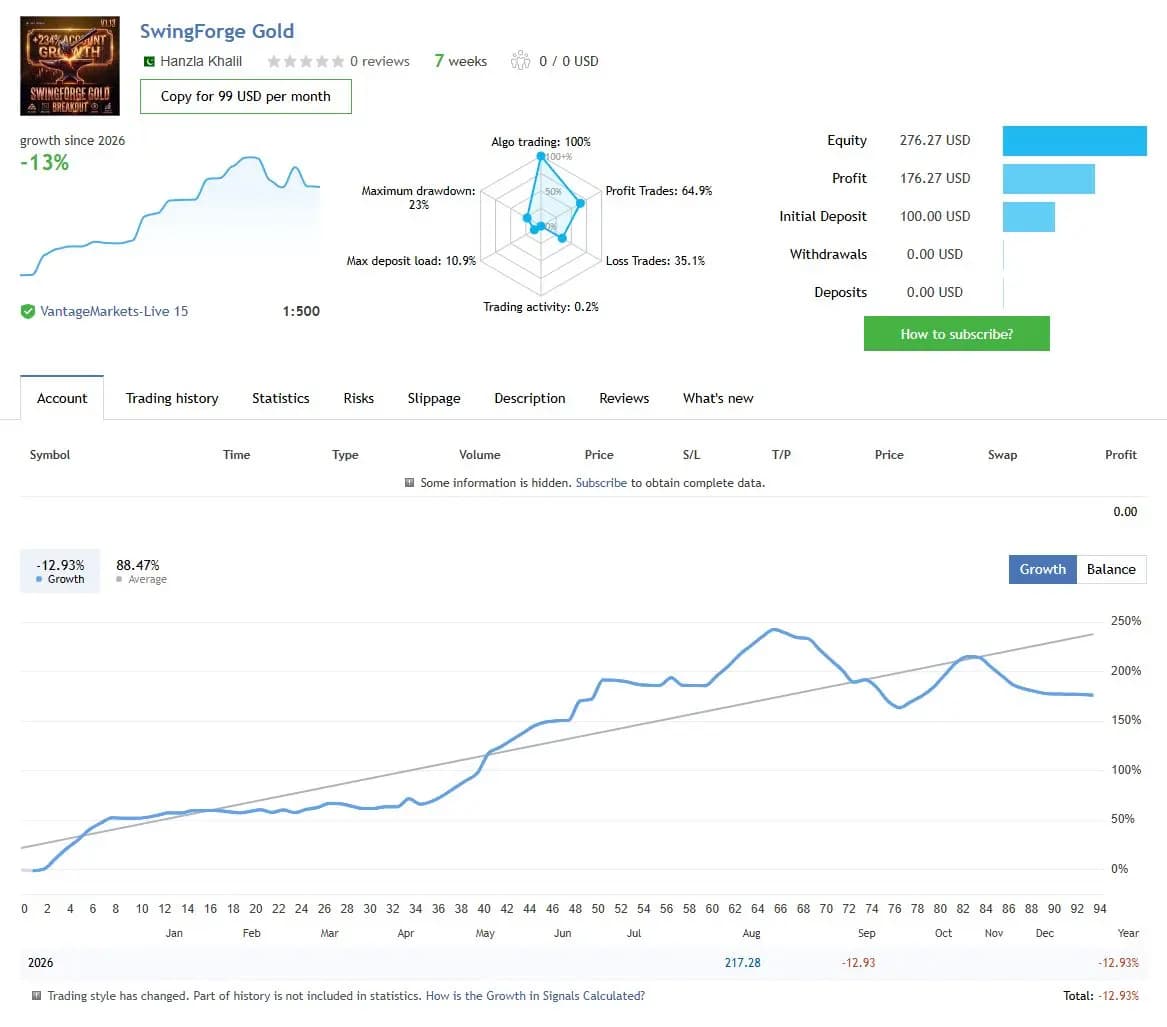
The figures below are a dated snapshot from the first account linked by the publisher. They describe that source account, not an independently controlled test of this product or a YO4X result. Check its full history, deposits, withdrawals and current settings before comparing performance.
Dated publisher-linked MQL5 account snapshot · Source labels this a real account · Checked 2026-09-17. The first recorded linked source is used consistently, not selected by return.
Public-page screenshot captured 17 September 2026. Open the original account for its latest statistics and warnings. The image and numerical snapshot can reflect different capture times; neither is a YO4X account result.
What to assess before choosing Swing Forge Gold EA
Resolve the seven-versus-eight zone discrepancy.
Review early fakeout exits including missed later continuations.
Check interactions between holding-time and protection rules.
Third-party product research, not YO4X trading results. Past results do not establish future returns.
Publisher material
Swing Forge Gold EA images
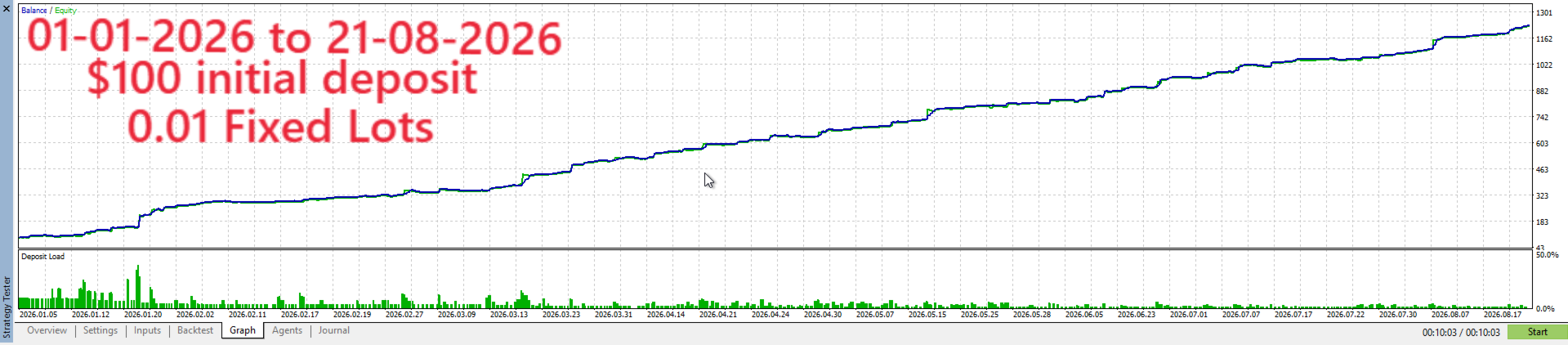
Original publisher material. Embedded figures may describe a simulation or an earlier account snapshot; this is not a YO4X result.Original source ↗
Try before choosing
Swing Forge Gold EA: tester demo and licence options
MQL5 provides tester-only demonstrations for Market EAs and indicators. Open the original listing to check its demo option. An EA demo runs its trading logic in the Strategy Tester; an indicator demo is viewed in visual testing mode. This is different from receiving a free licence to run the full product on an online chart.
For Swing Forge Gold EA, use the setup notes above to identify what the tester can demonstrate and what still requires a supported account, data source or publisher guidance. Read MQL5’s product-testing rules ↗
Explore YO4X
Free local access. Clear product terms.
YO4X offers free local access to its supported strategy catalogue through the Windows app on supported MT5 demo accounts. This research page does not confirm that Swing Forge Gold EA is included or compatible.
A free full-product licence is not confirmed here for Swing Forge Gold EA. Check the publisher’s current purchase, rental or tester options on MQL5. YO4X does not distribute the publisher’s EX5 file from this page.
Ask support about current app availability before choosing a strategy. Arbitrary EX5 uploads are not supported; cloud execution and brokerage costs are separate.
The captured text names eight but has a heading saying seven. This page does not hide the discrepancy. Check the current inputs and ask the author which count applies to the installed release before using a zone count in a performance or diversification claim.
Does minimum holding time prove prop-firm compatibility?
No. It addresses only one possible rule and can interact with other exits. The publisher also qualifies the zone optimisation. Compare the firm’s complete requirements and test the configured behaviour instead of treating a single input as blanket approval.
Sources and editorial notes
Source review: 17 September 2026. This guide draws on the official product listing and 4 publisher-linked account references. A link does not mean we have reviewed the file contents. Where reviewed, the guide summarizes them with attribution.
YO4X Research is the site’s editorial attribution, not a certification or a named independent tester. We have not installed or forward-tested this product for this guide. Publisher claims, screenshots and source-account statistics do not establish that the current version reproduces those results. Artwork belongs to its original publisher.