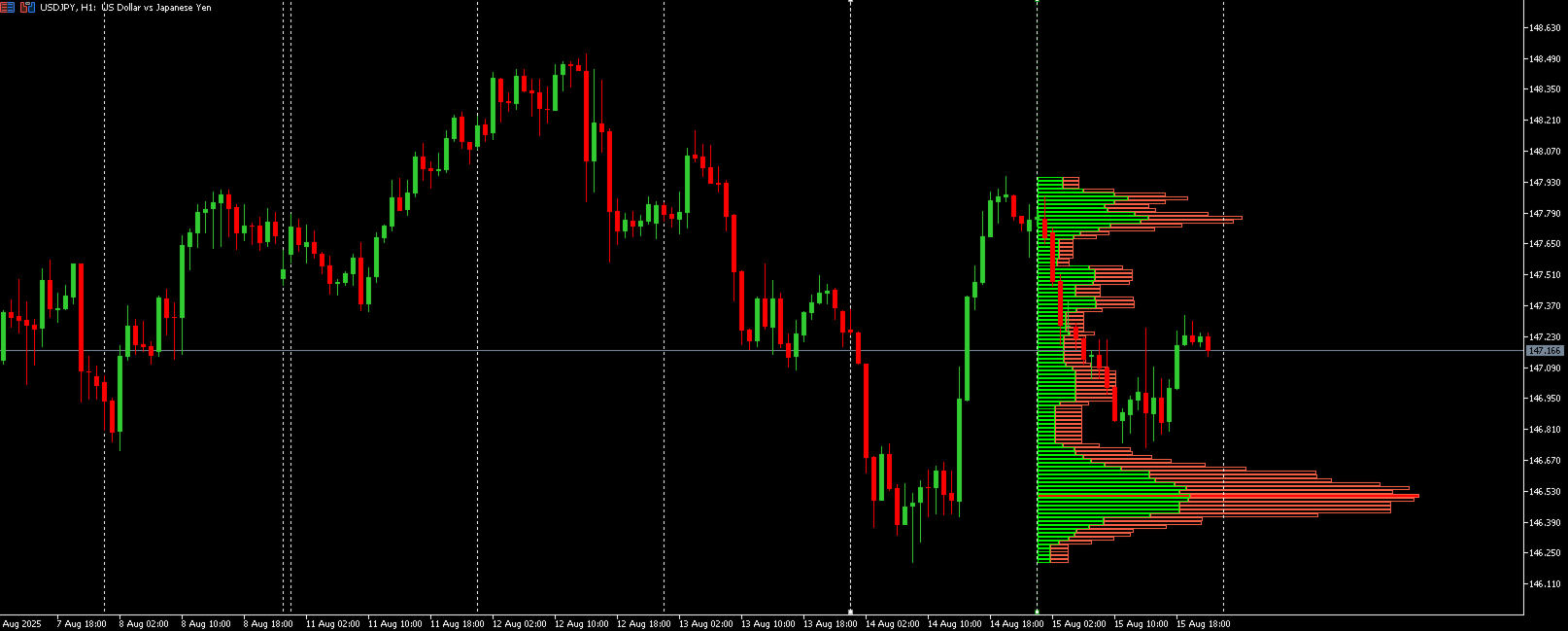
Smart Volume Profile is a free MT5 indicator that distributes volume across a selected price range and marks POC, VAH and VAL. Its buy/sell display depends on available data and includes a fallback when suitable trade ticks are missing.
The two boundary lines define the analysed period. Moving either line changes the sample and can shift the dominant price level. Keep the range fixed when comparing an observed reaction with a historical profile; otherwise the reference may incorporate information that arrived later.
Configuration and evidence to review
The publisher distinguishes real trade ticks from bar-based fallback classification. A buy/sell split derived through fallback is not direct observation of every transaction. Record the data mode, bucket count and value-area percentage so profiles from different brokers or settings can be compared meaningfully.
Before installation
Settings and setup requirements
These notes summarize the publisher material reviewed for Smart Volume Profile. Check the original manual and current release before configuring an account.
Documented setup
MT5 indicator; set VP begin and VP finish, bucket count and volume mode.
Product category
Indicators
Marketplace terms
Listed free on the checked date; confirm current publisher terms.
Publisher price at review
Free. Confirm current purchase and rental terms on MQL5.
Source evidence
Indicator examples and evidence
No direct MQL5 signal account was identified in the reviewed description. For analytical tools, account performance also depends on the separate trading rules and execution.
What to assess before choosing Smart Volume Profile
MT5 indicator; set VP begin and VP finish, bucket count and volume mode.
Does every broker provide an equally precise buy/sell split?
Verify the tool’s data source, timing and role separately from trade execution.
Third-party product research, not YO4X trading results. Past results do not establish future returns.
Publisher material
Smart Volume Profile images
Original publisher material. Embedded figures may describe a simulation or an earlier account snapshot; this is not a YO4X result.Original source ↗
Try before choosing
Smart Volume Profile: free download and setup
The publisher listed this product as free at review. Open its official MQL5 listing and use the MetaTrader terminal download workflow. Confirm the current listing and licence before installation.
For Smart Volume Profile, use the setup notes above to identify what the tester can demonstrate and what still requires a supported account, data source or publisher guidance. Read MQL5’s product-testing rules ↗
Explore YO4X
Free local access. Clear product terms.
YO4X offers free local access to its supported strategy catalogue through the Windows app on supported MT5 demo accounts. This research page does not confirm that Smart Volume Profile is included or compatible.
The publisher listed Smart Volume Profile as free at review. Download it through the official MQL5 listing; its licence and installation requirements still apply. YO4X does not distribute the publisher’s EX5 file from this page.
Ask support about current app availability before choosing a strategy. Arbitrary EX5 uploads are not supported; cloud execution and brokerage costs are separate.
Does every broker provide an equally precise buy/sell split?
No. The indicator uses available trade data or a fallback, so the information content can differ by feed.
Is Smart Volume Profile free?
The official MQL5 listing was free when checked. Obtain it through the publisher’s official page and confirm any dependencies, account requirements and licence terms. This research page does not establish YO4X compatibility.
Does this guide verify Smart Volume Profile live returns?
No. Publisher descriptions and screenshots are source material, not independently verified account returns. Any linked monitoring should be checked for account type, dates, deposits, withdrawals and floating drawdown.
Sources and editorial notes
Source review: 22 September 2026. This guide draws on the official product listing. A link does not mean we have reviewed the file contents. Where reviewed, the guide summarizes them with attribution.
YO4X Research is the site’s editorial attribution, not a certification or a named independent tester. We have not installed or forward-tested this product for this guide. Publisher claims, screenshots and source-account statistics do not establish that the current version reproduces those results. Artwork belongs to its original publisher.