Smart Gold Impulse is presented as an early-release Gold EA undergoing feedback from users across broker environments. The publisher states that it avoids grid, martingale, averaging and recovery, and links a public signal. The public description is brief on the entry mechanism and installation specifications. This research therefore keeps those gaps visible rather than inventing a timeframe, deposit requirement or strategy explanation from the product’s name.
The author explicitly frames the product as a launch version and asks early users to compare behaviour across brokers. That suggests the configuration and supporting guidance may evolve. Keep the software version, file date and broker conditions with every observation. If an update changes behaviour, start a new comparison period rather than combining it silently with an older sample. A growing feedback group can help identify operational issues, but its existence is not independent validation of profitability.
Follow the documented progression of settings
The listing describes moving through demo, starter and signal settings, with access to current files through the purchaser workflow. These should be treated as different configurations until their differences are documented. Ask which inputs change, how volume is calculated and what protective exits are used. A signal file is not automatically appropriate for another balance or contract. The absence of recovery mechanics does not explain the maximum monetary loss of an individual position or a run of losses.
Questions the public listing does not answer
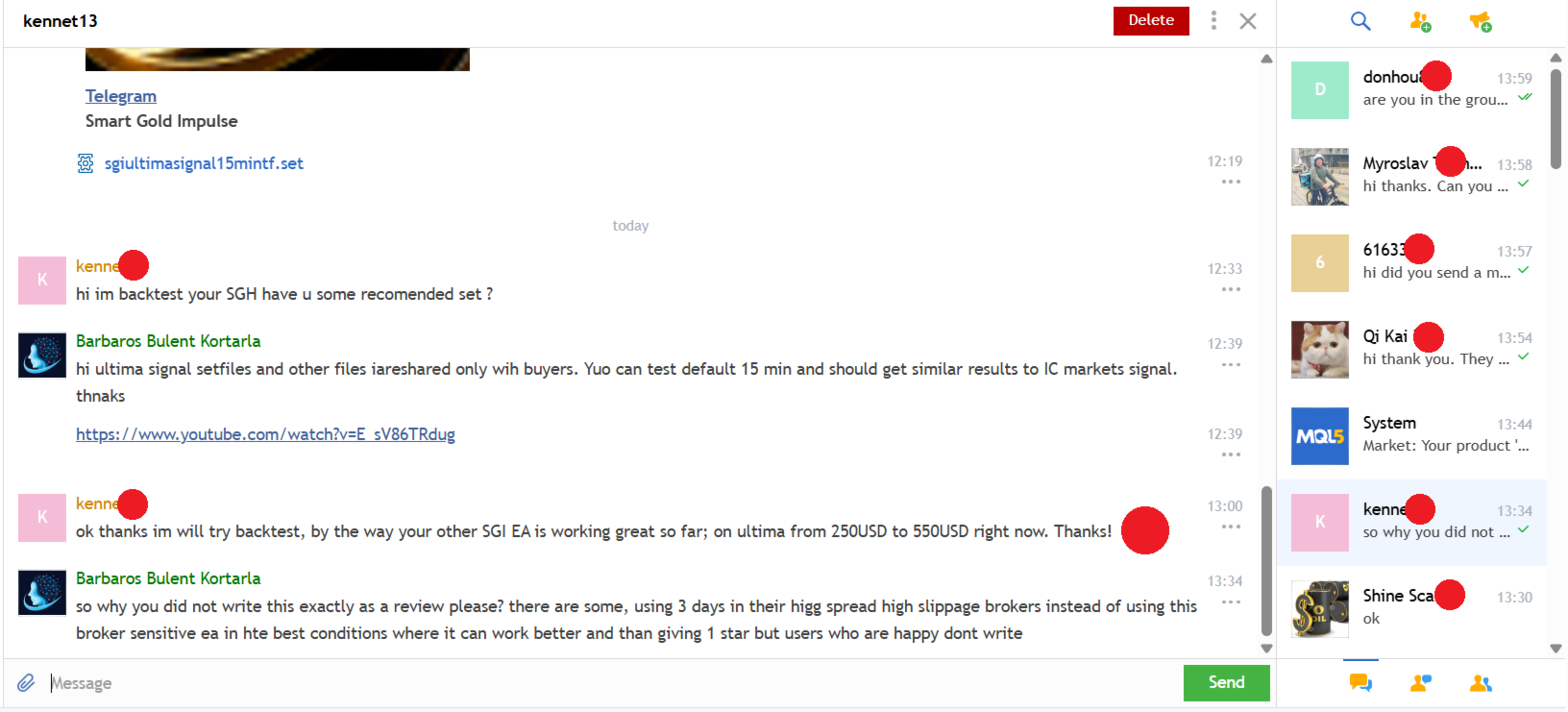
Before evaluating the EA, obtain the supported symbol naming, chart period, account mode, exit behaviour and terminal-dependency requirements from the publisher. The live signal can show what one account has done, but it cannot supply all missing implementation details. Compare trade timestamps, costs and exposure with the exact signal configuration when available. Broker sensitivity is specifically acknowledged in the description, so differences in spread, slippage and hosting should be recorded rather than treated as incidental noise.
Before installation
Settings and setup requirements
These notes summarize the publisher material reviewed for Smart Gold Impulse EA. Check the original manual and current release before configuring an account.
Release context
Publisher describes an early-launch version
Settings access
Demo, starter and signal configurations are mentioned; request current guidance
Public evidence
Publisher-linked MQL5 account; no return figure asserted here
Publisher price at review
199 USD. Confirm current purchase and rental terms on MQL5.
Source evidence
Signals, profit and drawdown
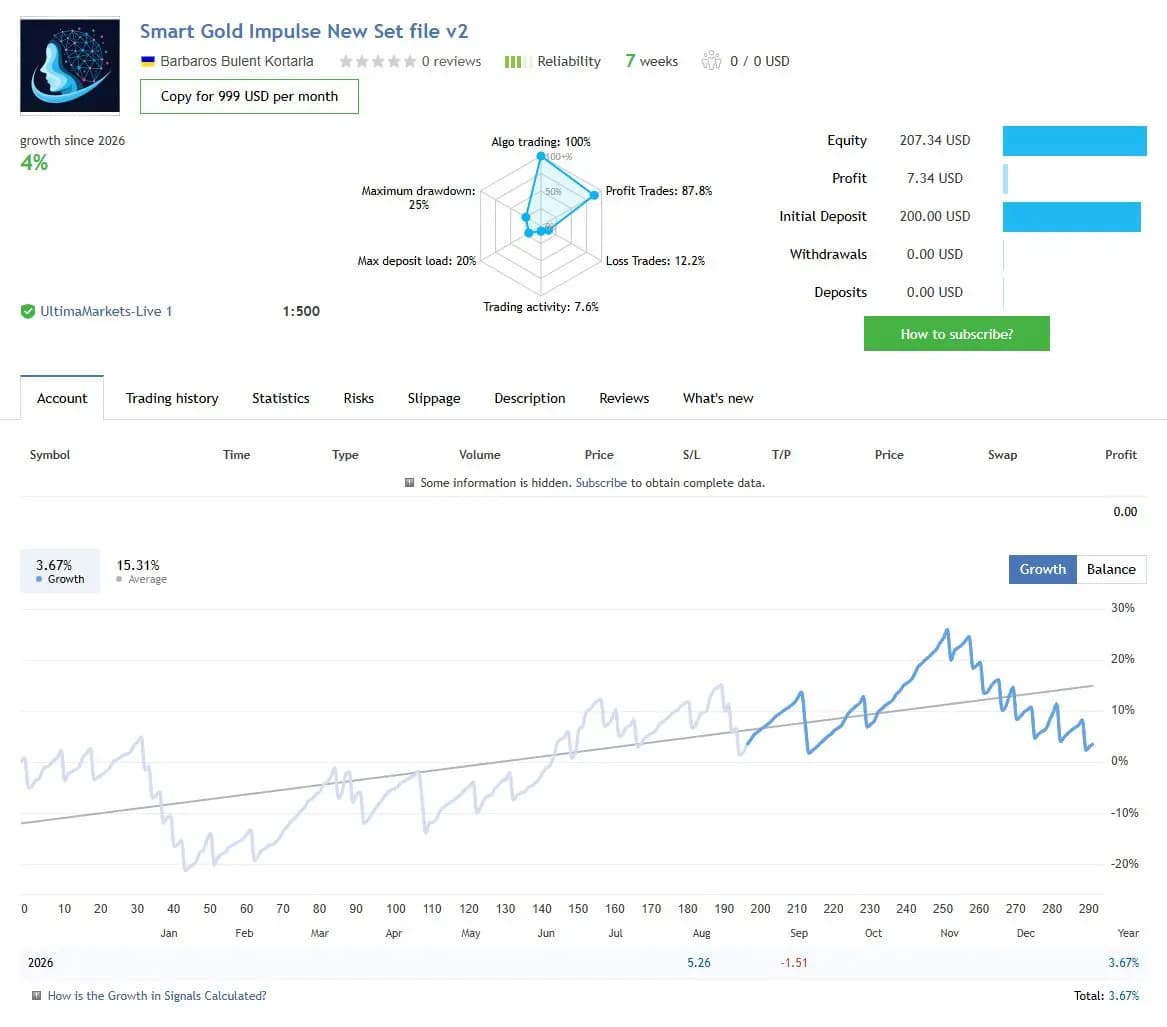
The figures below are a dated snapshot from the first account linked by the publisher. They describe that source account, not an independently controlled test of this product or a YO4X result. Check its full history, deposits, withdrawals and current settings before comparing performance.
Dated publisher-linked MQL5 account snapshot · Source labels this a real account · Checked 2026-09-17. The first recorded linked source is used consistently, not selected by return.
Public-page screenshot captured 17 September 2026. Open the original account for its latest statistics and warnings. The image and numerical snapshot can reflect different capture times; neither is a YO4X account result.
What to assess before choosing Smart Gold Impulse EA
Keep launch-version changes in the research record.
Request missing installation and exit specifications.
Separate demo, starter and signal settings until their differences are understood.
Third-party product research, not YO4X trading results. Past results do not establish future returns.
Publisher material
Smart Gold Impulse EA images
Original publisher material. Embedded figures may describe a simulation or an earlier account snapshot; this is not a YO4X result.Original source ↗
Try before choosing
Smart Gold Impulse EA: tester demo and licence options
MQL5 provides tester-only demonstrations for Market EAs and indicators. Open the original listing to check its demo option. An EA demo runs its trading logic in the Strategy Tester; an indicator demo is viewed in visual testing mode. This is different from receiving a free licence to run the full product on an online chart.
For Smart Gold Impulse EA, use the setup notes above to identify what the tester can demonstrate and what still requires a supported account, data source or publisher guidance. Read MQL5’s product-testing rules ↗
Explore YO4X
Free local access. Clear product terms.
YO4X offers free local access to its supported strategy catalogue through the Windows app on supported MT5 demo accounts. This research page does not confirm that Smart Gold Impulse EA is included or compatible.
A free full-product licence is not confirmed here for Smart Gold Impulse EA. Check the publisher’s current purchase, rental or tester options on MQL5. YO4X does not distribute the publisher’s EX5 file from this page.
Ask support about current app availability before choosing a strategy. Arbitrary EX5 uploads are not supported; cloud execution and brokerage costs are separate.
The captured public description does not specify it. Obtain the current setup instructions from the author rather than guessing from the Gold focus or product name. The required chart and supported account mode should be settled before a demo comparison is interpreted.
Can the signal set be copied without checking risk?
A set file can include settings tied to the signal account’s balance, contract or operating assumptions. Ask what each risk input measures and compare it with the intended account. A file that reproduces one account’s configuration does not guarantee the same exposure or outcome elsewhere.
Sources and editorial notes
Source review: 17 September 2026. This guide draws on the official product listing and 2 publisher-linked account references. A link does not mean we have reviewed the file contents. Where reviewed, the guide summarizes them with attribution.
YO4X Research is the site’s editorial attribution, not a certification or a named independent tester. We have not installed or forward-tested this product for this guide. Publisher claims, screenshots and source-account statistics do not establish that the current version reproduces those results. Artwork belongs to its original publisher.