Luna AI Pro MT5 is described as a night-session mean-reversion scalper with multi-pair operation from one chart. The publisher highlights per-pair risk adjustments and news filtering.
The listed performance monitor can reduce a pair’s risk after weak results and increase it again after improvement. That means risk is not necessarily constant across time or symbols. The primary and secondary pair lists should not be merged without checking the chosen preset. Night-session execution also makes rollover spreads and broker timing important parts of a realistic test.
Evaluating Luna AI Pro MT5 in practice
Luna’s per-pair performance monitor makes the path of risk allocation important. If a pair is reduced after losses and increased after recovery, its later contribution differs from a fixed-size replay. Preserve the monitor state or at least the sequence of allocated volumes when comparing runs. Resetting that state halfway through an observation changes the effective test.
The primary pair list and the longer secondary list are not equivalent endorsements. A sensible review begins with the intended preset and records which symbols were enabled, including broker suffix mapping. Several pairs can share AUD or GBP exposure even if their individual charts appear unrelated.
Night scalping also needs an explicit session clock. A broker offset change can move the trading window into a different liquidity period. Capture spreads near rollover and include orders that the news or spread filters rejected. When reviewing a live signal, compare its pair universe and monitor settings with the local installation; the signal’s aggregate growth cannot establish how every optional pair would behave.
Before installation
Settings and setup requirements
These notes summarize the publisher material reviewed for Luna AI Pro MT5 EA. Check the original manual and current release before configuring an account.
Publisher setup notes
Primary pairs include EURAUD, GBPAUD, AUDUSD and AUDCAD; configure one-chart mode using the linked setup guide.
Documentation
Public guidance is linked below. Match it to the current release and confirm whether additional presets require contacting the author.
Publisher price at review
399 USD. Confirm current purchase and rental terms on MQL5.
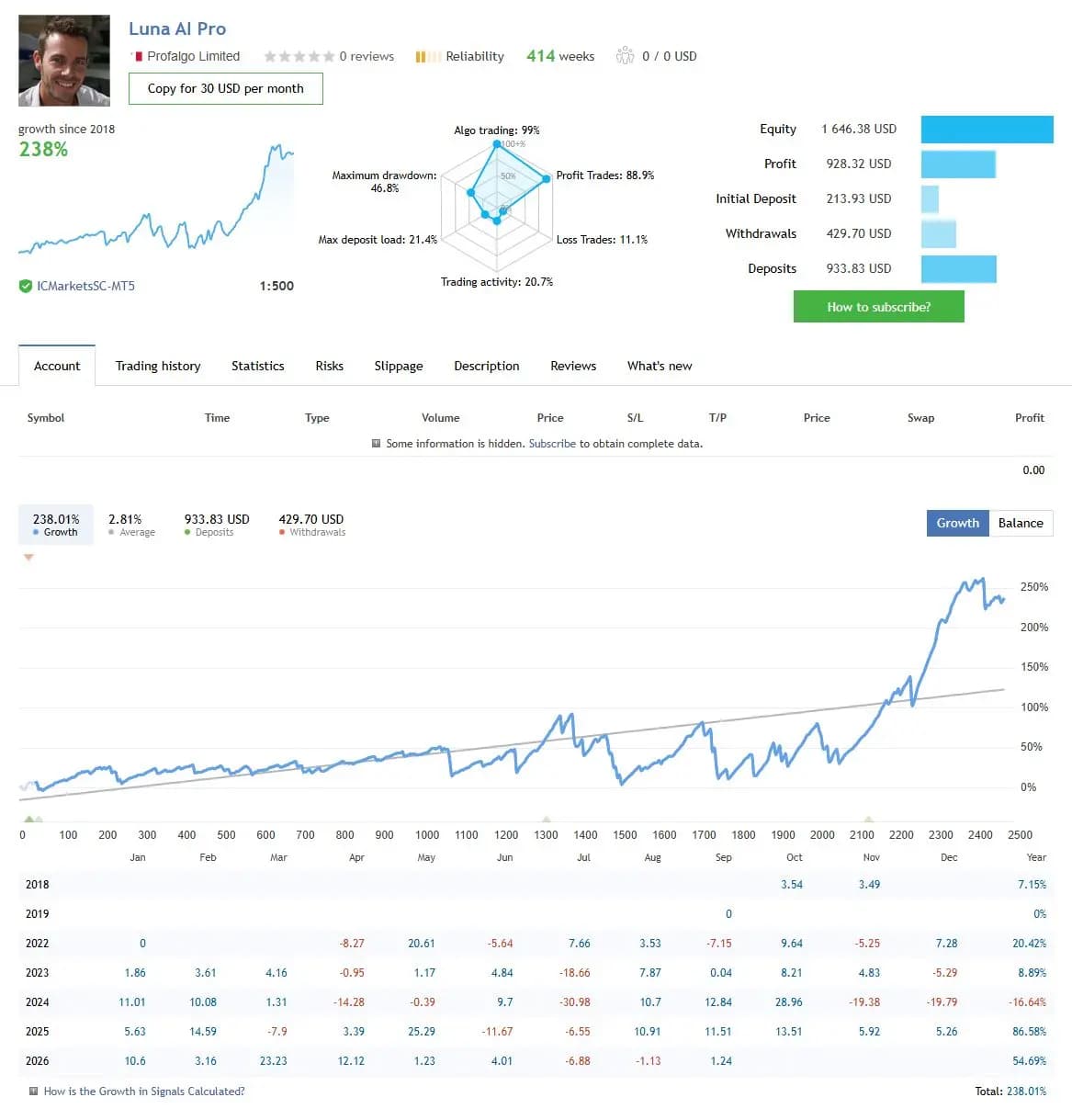
The figures below are a dated snapshot from the first account linked by the publisher. They describe that source account, not an independently controlled test of this product or a YO4X result. Check its full history, deposits, withdrawals and current settings before comparing performance.
Dated publisher-linked MQL5 account snapshot · Source labels this a real account · Checked 2026-09-17. The first recorded linked source is used consistently, not selected by return.
Public-page screenshot captured 17 September 2026. Open the original account for its latest statistics and warnings. The image and numerical snapshot can reflect different capture times; neither is a YO4X account result.
What to assess before choosing Luna AI Pro MT5 EA
Compare pair-level exposure before and after monitor adjustments. Include rollover spread observations and confirm the broker session clock rather than copying another account’s local time.
Third-party product research, not YO4X trading results. Past results do not establish future returns.
Publisher material
Luna AI Pro MT5 EA images
Original publisher material. Embedded figures may describe a simulation or an earlier account snapshot; this is not a YO4X result.Original source ↗
Try before choosing
Luna AI Pro MT5 EA: tester demo and licence options
MQL5 provides tester-only demonstrations for Market EAs and indicators. Open the original listing to check its demo option. An EA demo runs its trading logic in the Strategy Tester; an indicator demo is viewed in visual testing mode. This is different from receiving a free licence to run the full product on an online chart.
For Luna AI Pro MT5 EA, use the setup notes above to identify what the tester can demonstrate and what still requires a supported account, data source or publisher guidance. Read MQL5’s product-testing rules ↗
Explore YO4X
Free local access. Clear product terms.
YO4X offers free local access to its supported strategy catalogue through the Windows app on supported MT5 demo accounts. This research page does not confirm that Luna AI Pro MT5 EA is included or compatible.
A free full-product licence is not confirmed here for Luna AI Pro MT5 EA. Check the publisher’s current purchase, rental or tester options on MQL5. YO4X does not distribute the publisher’s EX5 file from this page.
Ask support about current app availability before choosing a strategy. Arbitrary EX5 uploads are not supported; cloud execution and brokerage costs are separate.
Its performance monitor is described as adjusting allocation after stronger or weaker results. Later volume can therefore depend on earlier outcomes. Recording only the final input screen may omit that path. Keep the sequence of pair allocations or state changes when possible, and distinguish an uninterrupted run from a reset that starts the monitor again.
Can I download Luna AI Pro MT5 free through YO4X?
This page is product research and does not distribute the original Luna AI Pro MT5 file or confirm it is included in YO4X. Check the official MQL5 listing for current free, demo, rental or purchase options. YO4X’s free local access applies to its supported catalogue; ask support about this exact product.
Sources and editorial notes
Source review: 17 September 2026. This guide draws on the official product listing, 2 linked publisher guidance references and 1 publisher-linked account reference. A link does not mean we have reviewed the file contents. Where reviewed, the guide summarizes them with attribution.
YO4X Research is the site’s editorial attribution, not a certification or a named independent tester. We have not installed or forward-tested this product for this guide. Publisher claims, screenshots and source-account statistics do not establish that the current version reproduces those results. Artwork belongs to its original publisher.