Razor MT5 is a multi-currency mean-reversion system operated from one chart. Its publisher describes a common stop and permits additional trades during drawdown, despite distinguishing the method from a simple grid.
The intended basket includes AUDCAD, AUDNZD and NZDCAD. Additional entries change exposure and the shared-stop outcome, so the recovery sequence needs examination regardless of its label. The source also names spread, volatility and news controls. Faster OHLC testing can screen settings, but detailed tick-level checks are relevant to final trade-management validation.
Evaluating Razor MT5 in practice
Razor’s additional-trade allowance makes the shared stop more informative than the initial entry alone. Follow a complete adverse sequence and calculate total open volume immediately before the common exit. A fixed stop can still crystallize a substantial basket loss when several positions accumulate behind it.
The three intended currency crosses share AUD, NZD and CAD exposure. Review positions together during a broad move in one of those currencies. Running from one chart is an operational convenience, not evidence that the underlying pair risks cancel each other.
The source promotes spread adaptation and volatility filtering. Check how those features affect actual orders: whether they delay an entry, widen a threshold or change another parameter. Record the spread at rejected as well as accepted opportunities. Faster OHLC testing can be useful for initial screening, but compare a detailed period where additional trades and trailing or common-stop actions matter. A result from an adapted Gold configuration would be a separate experiment from the supplied three-cross setup.
Before installation
Settings and setup requirements
These notes summarize the publisher material reviewed for Razor MT5 EA. Check the original manual and current release before configuring an account.
Publisher setup notes
AUDCAD M15 attachment; internal AUDCAD/AUDNZD/NZDCAD basket; obtain current guide and verify additional-trade cap and common stop.
Documentation
Public guidance is linked below. Match it to the current release and confirm whether additional presets require contacting the author.
Publisher price at review
745 USD. Confirm current purchase and rental terms on MQL5.
No direct public MQL5 account was identified in the reviewed product description. Ask the publisher for current monitoring; this does not establish that no account exists.
What to assess before choosing Razor MT5 EA
Examine the maximum accumulated basket and common-stop loss. Compare broker spreads and correlated cross-pair exposure instead of relying only on the balance curve.
Third-party product research, not YO4X trading results. Past results do not establish future returns.
Publisher material
Razor MT5 EA images
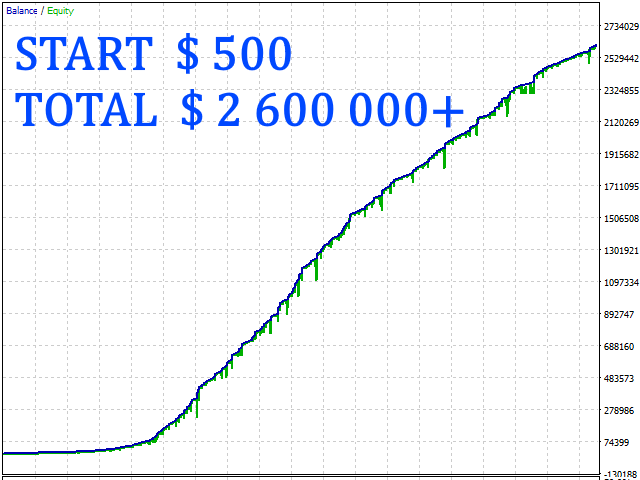
Original publisher material. Embedded figures may describe a simulation or an earlier account snapshot; this is not a YO4X result.Original source ↗
Try before choosing
Razor MT5 EA: tester demo and licence options
MQL5 provides tester-only demonstrations for Market EAs and indicators. Open the original listing to check its demo option. An EA demo runs its trading logic in the Strategy Tester; an indicator demo is viewed in visual testing mode. This is different from receiving a free licence to run the full product on an online chart.
For Razor MT5 EA, use the setup notes above to identify what the tester can demonstrate and what still requires a supported account, data source or publisher guidance. Read MQL5’s product-testing rules ↗
Explore YO4X
Free local access. Clear product terms.
YO4X offers free local access to its supported strategy catalogue through the Windows app on supported MT5 demo accounts. This research page does not confirm that Razor MT5 EA is included or compatible.
A free full-product licence is not confirmed here for Razor MT5 EA. Check the publisher’s current purchase, rental or tester options on MQL5. YO4X does not distribute the publisher’s EX5 file from this page.
Ask support about current app availability before choosing a strategy. Arbitrary EX5 uploads are not supported; cloud execution and brokerage costs are separate.
Why count Razor’s additional entries with the original trade?
They share the adverse sequence and common protective logic described by the publisher. Looking only at the first order understates later volume, while counting each favorable close independently can overstate the number of separate opportunities. Review basket-level profit, maximum exposure and equity decline together, then retain individual executions for checking fills and costs.
Can I download Razor MT5 free through YO4X?
This page is product research and does not distribute the original Razor MT5 file or confirm it is included in YO4X. Check the official MQL5 listing for current free, demo, rental or purchase options. YO4X’s free local access applies to its supported catalogue; ask support about this exact product.
Sources and editorial notes
Source review: 17 September 2026. This guide draws on the official product listing, 2 linked publisher guidance references. A link does not mean we have reviewed the file contents. Where reviewed, the guide summarizes them with attribution.
YO4X Research is the site’s editorial attribution, not a certification or a named independent tester. We have not installed or forward-tested this product for this guide. Publisher claims, screenshots and source-account statistics do not establish that the current version reproduces those results. Artwork belongs to its original publisher.