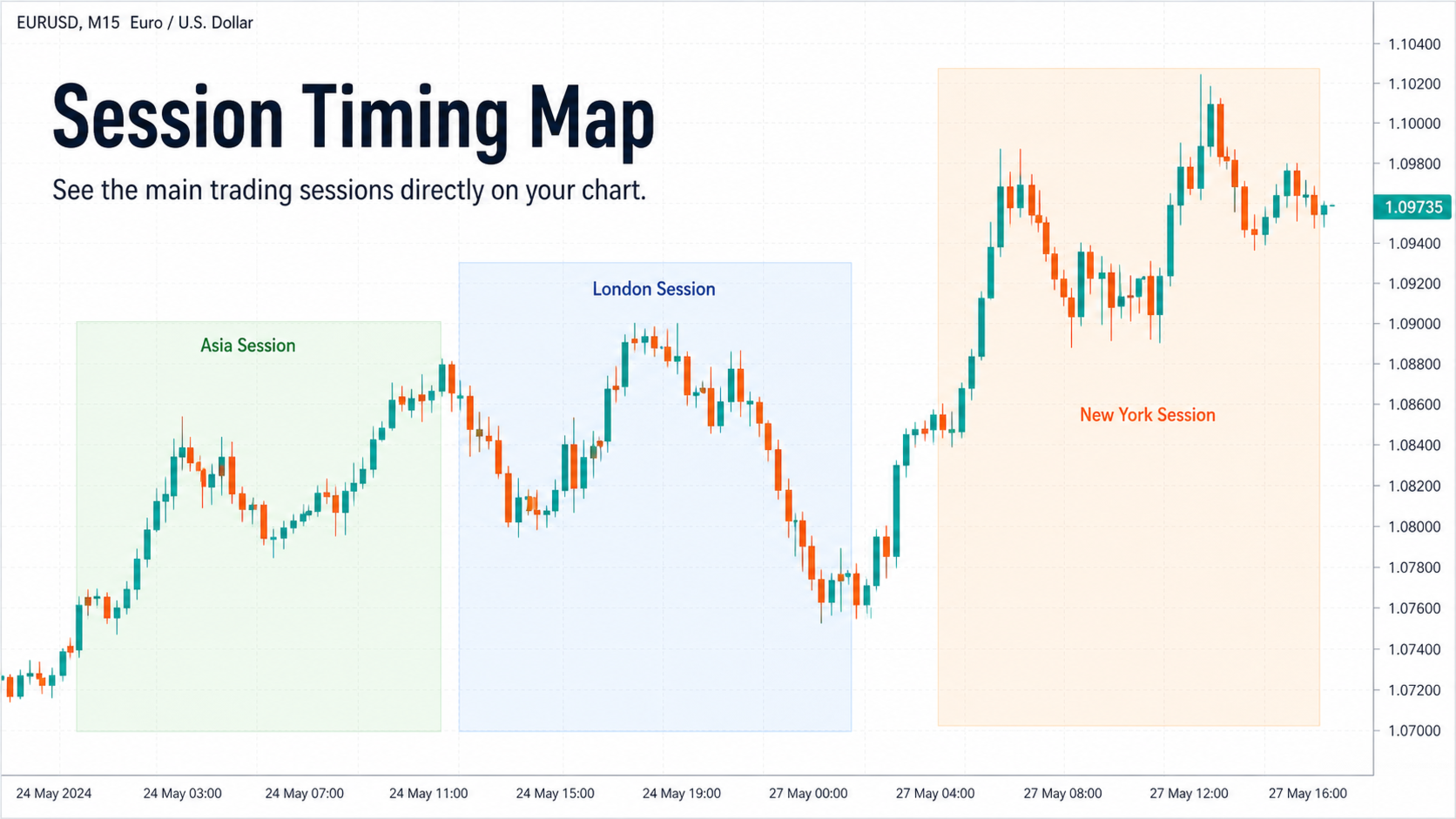
Trading Session ICT KillZone is a visual MT5 session indicator. It shades Asian, London and New York periods to help organize chart analysis without placing trades.
The indicator’s role is to show when price movement occurs relative to named sessions. It does not establish that a breakout in a shaded area is valid or that a reversal will follow. Use the zones alongside a separately defined trading method and record the exact time convention. Broker clock changes can affect session interpretation, so confirm the displayed boundaries rather than assuming they match the computer’s local timezone.
Limit chart clutter to the periods you use
The reviewed feature list includes visibility controls, colours, labels and the number of displayed zones. Showing only the sessions relevant to a study can make comparisons easier. Check a historical date against the intended market session and repeat that check around seasonal clock changes. The publisher mentions other Smart Money tools, but market structure, order blocks and automated execution should not be assumed included in this session-only indicator.
Before installation
Settings and setup requirements
These notes summarize the publisher material reviewed for Trading Session ICT KillZone. Check the original manual and current release before configuring an account.
Product type
Visual chart indicator
Displayed sessions
Asia, London and New York
Controls
Session visibility, colours, labels and visible-zone count
Publisher price at review
Free. Confirm current purchase and rental terms on MQL5.
Source evidence
Indicator examples and evidence
No direct public MQL5 account link was identified in the reviewed description. This does not establish that no monitoring exists. Publisher screenshots and backtests are not treated as independently verified live results.
What to assess before choosing Trading Session ICT KillZone
Confirm displayed session boundaries against broker time before using them in a study.
Third-party product research, not YO4X trading results. Past results do not establish future returns.
Publisher material
Trading Session ICT KillZone images
Original publisher material. Embedded figures may describe a simulation or an earlier account snapshot; this is not a YO4X result.Original source ↗
Try before choosing
Trading Session ICT KillZone: free download and setup
The publisher listed this product as free at review. Open its official MQL5 listing and use the MetaTrader terminal download workflow. Confirm the current listing and licence before installation.
For Trading Session ICT KillZone, use the setup notes above to identify what the tester can demonstrate and what still requires a supported account, data source or publisher guidance. Read MQL5’s product-testing rules ↗
Explore YO4X
Free local access. Clear product terms.
YO4X offers free local access to its supported strategy catalogue through the Windows app on supported MT5 demo accounts. This research page does not confirm that Trading Session ICT KillZone is included or compatible.
The publisher listed Trading Session ICT KillZone as free at review. Download it through the official MQL5 listing; its licence and installation requirements still apply. YO4X does not distribute the publisher’s EX5 file from this page.
Ask support about current app availability before choosing a strategy. Arbitrary EX5 uploads are not supported; cloud execution and brokerage costs are separate.
Does a highlighted KillZone generate an automatic trade?
No. The description explicitly says the tool does not open or close trades or place pending orders. It provides timing context; a trading strategy and order workflow must be defined separately.
Where should I obtain Trading Session ICT KillZone and its current settings?
Use the official MQL5 listing and Han Qin Lin's linked guidance. Confirm the current version, installation instructions and licence before use. This research page does not supply an EX5 file or establish that the product is available inside YO4X.
Sources and editorial notes
Source review: 22 September 2026. This guide draws on the official product listing. A link does not mean we have reviewed the file contents. Where reviewed, the guide summarizes them with attribution.
YO4X Research is the site’s editorial attribution, not a certification or a named independent tester. We have not installed or forward-tested this product for this guide. Publisher claims, screenshots and source-account statistics do not establish that the current version reproduces those results. Artwork belongs to its original publisher.