Silent Exit MT5 is a multi-currency EA described as using volume acceleration with additional filters for major Forex pairs. It manages seven USD-related pairs from a single EURUSD M15 chart. The publisher’s linked monitoring account is identified as a Darwinex Zero account rather than a personal $100,000 deposit. Keeping that distinction visible is essential when evaluating the displayed balance, capital at risk and meaning of the account record.
One chart can still create shared currency exposure
The product manages EURUSD, USDCAD, USDJPY, NZDUSD, USDCHF, AUDUSD and GBPUSD internally. Seven symbols are not necessarily seven independent sources of risk: all include the US dollar. During a broad USD move, several entries can become correlated. Review positions by currency direction and total account exposure, not only by the number of pair names. A single-chart interface simplifies organisation but does not reduce the financial interaction between those trades.
Volume acceleration depends on the observed feed
The publisher describes rapid changes in volume as an input to breakout detection, supplemented by indicators adapted to major pairs. Determine what the current version uses as its volume input and how it behaves on the intended broker feed. Differences in tick activity can change what a system observes. Keep the symbol list, data provider and configuration fixed when comparing samples, and inspect rejected setups as well as completed trades to understand the filter’s effect.
Read the monitoring-account qualification correctly
The listing explicitly says the $100,000 Darwinex Zero account is used to show trading activity and is not a deposit of that amount. Do not present that balance as personally invested capital or combine it with an unrelated return claim. The author also says correct historical testing requires a supplied configuration file and instructions. Obtain those details before reproducing a report. The advertised drawdown stop should be checked for its measurement base, reset behaviour and handling of already open positions.
Before installation
Settings and setup requirements
These notes summarize the publisher material reviewed for Silent Exit MT5 EA. Check the original manual and current release before configuring an account.
Chart
EURUSD, M15; one-chart multi-symbol operation
Markets
Seven major USD currency pairs
Evaluation access
Publisher offers a demo-account trial on request
Publisher price at review
199 USD. Confirm current purchase and rental terms on MQL5.
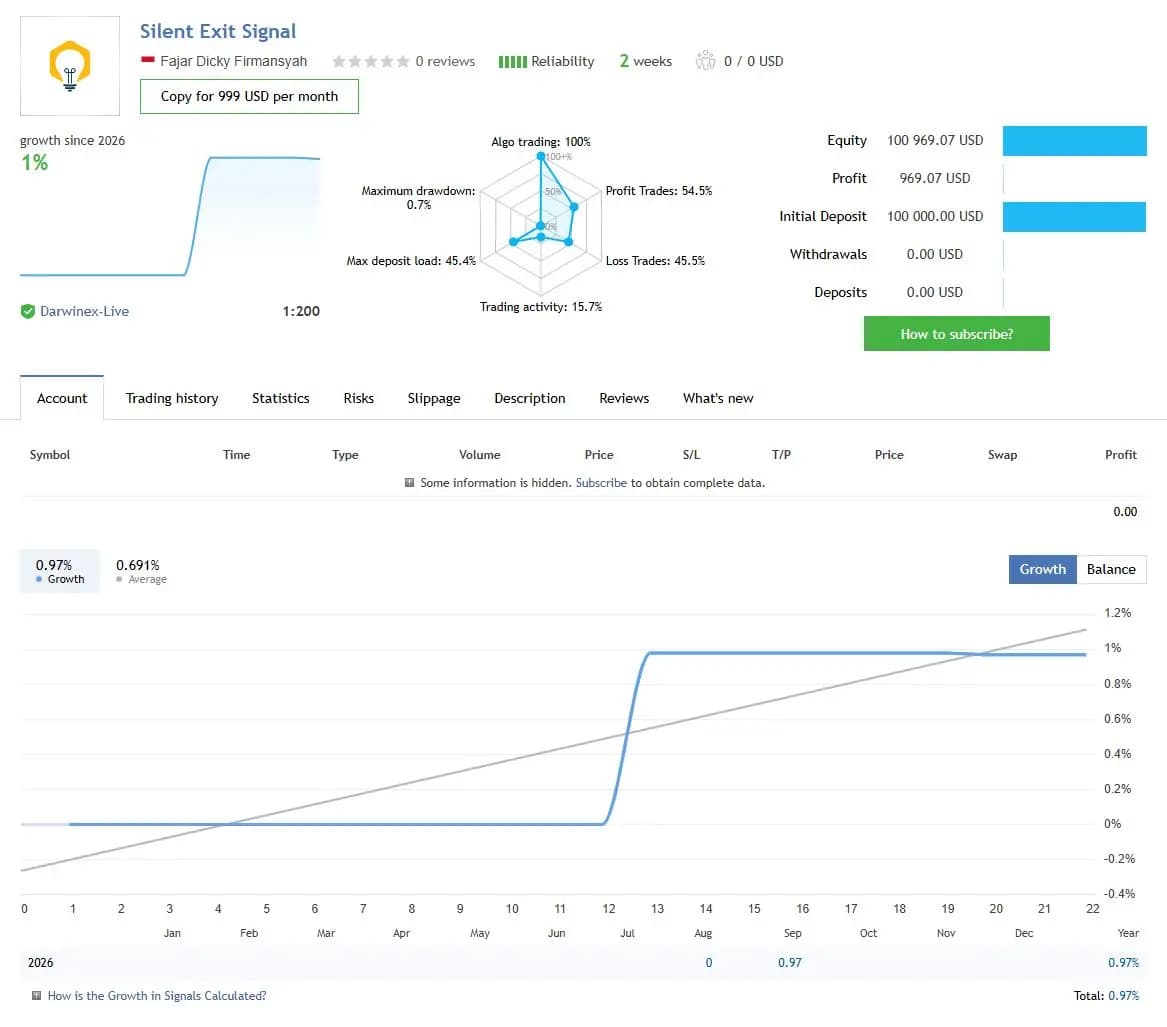
The figures below are a dated snapshot from the first account linked by the publisher. They describe that source account, not an independently controlled test of this product or a YO4X result. Check its full history, deposits, withdrawals and current settings before comparing performance.
Dated publisher-linked MQL5 account snapshot · Source labels this a real account · Checked 2026-09-17. The first recorded linked source is used consistently, not selected by return.
Public-page screenshot captured 17 September 2026. Open the original account for its latest statistics and warnings. The image and numerical snapshot can reflect different capture times; neither is a YO4X account result.
What to assess before choosing Silent Exit MT5 EA
Retain the Darwinex Zero qualification beside any account reference.
Aggregate currency exposure across the seven pairs.
Use the author’s configuration instructions when reproducing historical tests.
Third-party product research, not YO4X trading results. Past results do not establish future returns.
Publisher material
Silent Exit MT5 EA images
Original publisher material. Embedded figures may describe a simulation or an earlier account snapshot; this is not a YO4X result.Original source ↗
Try before choosing
Silent Exit MT5 EA: tester demo and licence options
MQL5 provides tester-only demonstrations for Market EAs and indicators. Open the original listing to check its demo option. An EA demo runs its trading logic in the Strategy Tester; an indicator demo is viewed in visual testing mode. This is different from receiving a free licence to run the full product on an online chart.
For Silent Exit MT5 EA, use the setup notes above to identify what the tester can demonstrate and what still requires a supported account, data source or publisher guidance. Read MQL5’s product-testing rules ↗
Explore YO4X
Free local access. Clear product terms.
YO4X offers free local access to its supported strategy catalogue through the Windows app on supported MT5 demo accounts. This research page does not confirm that Silent Exit MT5 EA is included or compatible.
A free full-product licence is not confirmed here for Silent Exit MT5 EA. Check the publisher’s current purchase, rental or tester options on MQL5. YO4X does not distribute the publisher’s EX5 file from this page.
Ask support about current app availability before choosing a strategy. Arbitrary EX5 uploads are not supported; cloud execution and brokerage costs are separate.
Is the displayed $100,000 a confirmed cash deposit?
The publisher explicitly describes the linked account as Darwinex Zero and says that amount was not personally deposited. Treat the record according to its account type. It can show trading behaviour without establishing that the displayed nominal balance represents cash invested by the author.
Does one-chart operation mean only EURUSD trades?
No. EURUSD M15 is the attachment chart, while the EA manages the documented pair list internally. Review the complete account and shared dollar exposure. Looking only at the visible chart can miss positions opened in the other managed symbols.
Sources and editorial notes
Source review: 17 September 2026. This guide draws on the official product listing, 1 linked publisher guidance reference and 1 publisher-linked account reference. A link does not mean we have reviewed the file contents. Where reviewed, the guide summarizes them with attribution.
YO4X Research is the site’s editorial attribution, not a certification or a named independent tester. We have not installed or forward-tested this product for this guide. Publisher claims, screenshots and source-account statistics do not establish that the current version reproduces those results. Artwork belongs to its original publisher.