PZ Day Trading EA MT5 places pending orders around untested price levels and trading ranges. It combines entry selectivity, market-based exits and configurable session restrictions.
The available modes range from most detected breakouts to confirmed ranges. Lookback, entry range and higher-timeframe filtering also influence eligibility, so comparing presets requires trade-count and skipped-setup information. The source warns about very small timeframes and thin instruments. Its provided symbol/timeframe setfiles are starting configurations; they do not establish that one instrument’s levels and costs transfer directly to another.
Gaps and Friday cleanup can explain inactivity
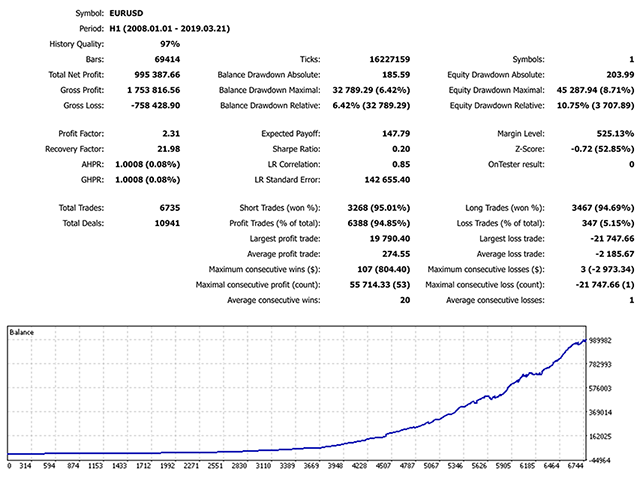
The optional gap protection waits for an unfilled daily or weekly gap to close. Friday handling and trading-session permissions can further restrict orders. The listing recommends keeping the EA running and avoiding another EA on the same symbol, which matters when evaluating shared-account behaviour. Use the current installation and troubleshooting guides to understand pending-order lifecycle, stop updates and timed expiry before treating the historical chart as a record of live fills.
Before installation
Settings and setup requirements
These notes summarize the publisher material reviewed for PZ Day Trading EA MT5. Check the original manual and current release before configuring an account.
Architecture
Pending breakout orders evaluated at bar close
Filters
Range mode, timeframe confirmation, gap and session controls
Publisher guidance
Do not run another EA on the same symbol; keep terminal online
Publisher price at review
299 USD. Confirm current purchase and rental terms on MQL5.
No direct public MQL5 account link was identified in the reviewed description. This does not establish that no monitoring exists. Publisher screenshots and backtests are not treated as independently verified live results.
What to assess before choosing PZ Day Trading EA MT5
Track which filter rejected an opportunity before loosening several settings at once.
Third-party product research, not YO4X trading results. Past results do not establish future returns.
Publisher material
PZ Day Trading EA MT5 images
Original publisher material. Embedded figures may describe a simulation or an earlier account snapshot; this is not a YO4X result.Original source ↗
Try before choosing
PZ Day Trading EA MT5: tester demo and licence options
MQL5 provides tester-only demonstrations for Market EAs and indicators. Open the original listing to check its demo option. An EA demo runs its trading logic in the Strategy Tester; an indicator demo is viewed in visual testing mode. This is different from receiving a free licence to run the full product on an online chart.
For PZ Day Trading EA MT5, use the setup notes above to identify what the tester can demonstrate and what still requires a supported account, data source or publisher guidance. Read MQL5’s product-testing rules ↗
Explore YO4X
Free local access. Clear product terms.
YO4X offers free local access to its supported strategy catalogue through the Windows app on supported MT5 demo accounts. This research page does not confirm that PZ Day Trading EA MT5 is included or compatible.
A free full-product licence is not confirmed here for PZ Day Trading EA MT5. Check the publisher’s current purchase, rental or tester options on MQL5. YO4X does not distribute the publisher’s EX5 file from this page.
Ask support about current app availability before choosing a strategy. Arbitrary EX5 uploads are not supported; cloud execution and brokerage costs are separate.
The selected range-confirmation mode, higher-timeframe filter, unclosed-gap protection, spread condition or session settings can reject it. Review the active preset and terminal log rather than assuming every visible new high or low qualifies.
Where should I obtain PZ Day Trading EA MT5 and its current settings?
Use the official MQL5 listing and PZ TRADING SLU's linked guidance. Confirm the current version, installation instructions and licence before use. This research page does not supply an EX5 file or establish that the product is available inside YO4X.
Sources and editorial notes
Source review: 22 September 2026. This guide draws on the official product listing, 4 linked publisher guidance references. A link does not mean we have reviewed the file contents. Where reviewed, the guide summarizes them with attribution.
YO4X Research is the site’s editorial attribution, not a certification or a named independent tester. We have not installed or forward-tested this product for this guide. Publisher claims, screenshots and source-account statistics do not establish that the current version reproduces those results. Artwork belongs to its original publisher.