Duelist MT5 combines independent EURUSD and AUDCAD modules in one EA attached to EURUSD. The publisher explicitly describes managed baskets and grids, with optional simultaneous buy and sell baskets. Starting lot size is therefore not the maximum exposure of the system. The research priority is to understand each module’s accumulation, stop policy and restart behaviour, then assess their combined use of account margin.
Two modules share one account even with separate settings
Each pair has its own identifier, direction, schedule, sizing and protection configuration. This makes component-level analysis possible, but does not create separate pools of margin. A difficult period in one basket can reduce capacity for the other. Review combined floating loss and available margin, especially when both modules start new sequences close together. EURUSD and AUDCAD diversify instrument exposure relative to a Gold-only portfolio, but diversification still needs evidence from overlapping outcomes.
Hedge mode changes the basket structure
With the described hedge option enabled, buy and sell baskets can operate concurrently. Opposite directions do not necessarily cancel risk: volumes, entry prices, financing costs and exit times can differ. When hedge mode is disabled, the EA blocks a new opposing basket while the existing one remains active. Compare these modes separately. The optional total stop is measured at module level, so confirm whether it is enabled and how a trigger affects all positions belonging to that module.
Restart recognition is an operational feature to verify
The author describes finding existing positions by symbol and magic number after restarts, reattachment or a VPS change. Test that recognition on demo before relying on migration. A changed identifier can leave positions outside the expected management path. Record the dashboard state and logs, and verify that paused entry windows still allow existing baskets to be managed. The publisher’s $1,000 recommendation for both modules is a setup reference, not a guarantee of sufficient margin under every grid sequence.
Manual access and first-launch checks
The public manual page provides an installation outline and links a fuller downloadable manual. It confirms the EURUSD M15 attachment and instructs users to verify terminal-wide trading permission and the Experts log. The short web outline does not resolve every grid or stop detail, so use the full current document for parameter definitions. After loading settings, verify both module states and position recognition before interpreting an absence of new trades as a strategy decision.
Before installation
Settings and setup requirements
These notes summarize the publisher material reviewed for Duelist MT5 EA. Check the original manual and current release before configuring an account.
Attachment
Broker EURUSD symbol, M15 recommended
Account mode
MT5 hedging account
Structure
EURUSD and AUDCAD grid/basket modules with separate settings
Publisher price at review
145 USD. Confirm current purchase and rental terms on MQL5.
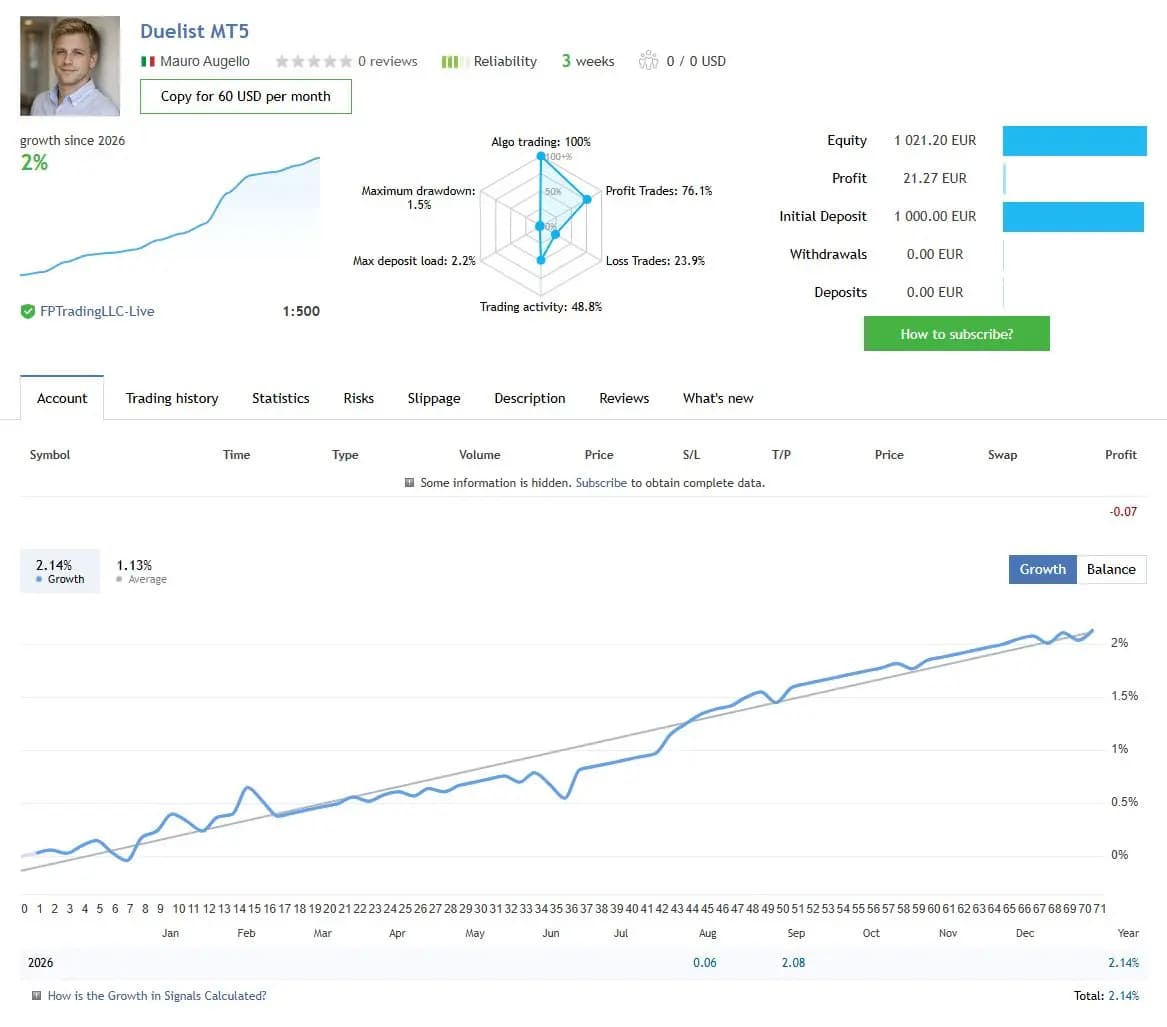
The figures below are a dated snapshot from the first account linked by the publisher. They describe that source account, not an independently controlled test of this product or a YO4X result. Check its full history, deposits, withdrawals and current settings before comparing performance.
Dated publisher-linked MQL5 account snapshot · Source labels this a real account · Checked 2026-09-17. The first recorded linked source is used consistently, not selected by return.
Public-page screenshot captured 17 September 2026. Open the original account for its latest statistics and warnings. The image and numerical snapshot can reflect different capture times; neither is a YO4X account result.
What to assess before choosing Duelist MT5 EA
Review both module-level and account-level exposure.
Make the optional total-stop setting explicit.
Verify position recognition after controlled restarts or migration.
Third-party product research, not YO4X trading results. Past results do not establish future returns.
Publisher material
Duelist MT5 EA images
Original publisher material. Embedded figures may describe a simulation or an earlier account snapshot; this is not a YO4X result.Original source ↗
Try before choosing
Duelist MT5 EA: tester demo and licence options
MQL5 provides tester-only demonstrations for Market EAs and indicators. Open the original listing to check its demo option. An EA demo runs its trading logic in the Strategy Tester; an indicator demo is viewed in visual testing mode. This is different from receiving a free licence to run the full product on an online chart.
For Duelist MT5 EA, use the setup notes above to identify what the tester can demonstrate and what still requires a supported account, data source or publisher guidance. Read MQL5’s product-testing rules ↗
Explore YO4X
Free local access. Clear product terms.
YO4X offers free local access to its supported strategy catalogue through the Windows app on supported MT5 demo accounts. This research page does not confirm that Duelist MT5 EA is included or compatible.
A free full-product licence is not confirmed here for Duelist MT5 EA. Check the publisher’s current purchase, rental or tester options on MQL5. YO4X does not distribute the publisher’s EX5 file from this page.
Ask support about current app availability before choosing a strategy. Arbitrary EX5 uploads are not supported; cloud execution and brokerage costs are separate.
No. The publisher explicitly says fixed or automatic lot settings define initial volume. Additional basket positions can increase total exposure. Review maximum depth, aggregate volume and module-stop behaviour rather than estimating risk from the first ticket alone.
What should be checked when moving to a VPS?
Keep the symbols and magic numbers consistent, confirm that existing positions are recognised and verify that their management path is active. A running dashboard is not enough if the software no longer associates an open basket with the intended module.
Sources and editorial notes
Source review: 17 September 2026. This guide draws on the official product listing, 1 linked publisher guidance reference and 1 publisher-linked account reference. A link does not mean we have reviewed the file contents. Where reviewed, the guide summarizes them with attribution.
YO4X Research is the site’s editorial attribution, not a certification or a named independent tester. We have not installed or forward-tested this product for this guide. Publisher claims, screenshots and source-account statistics do not establish that the current version reproduces those results. Artwork belongs to its original publisher.