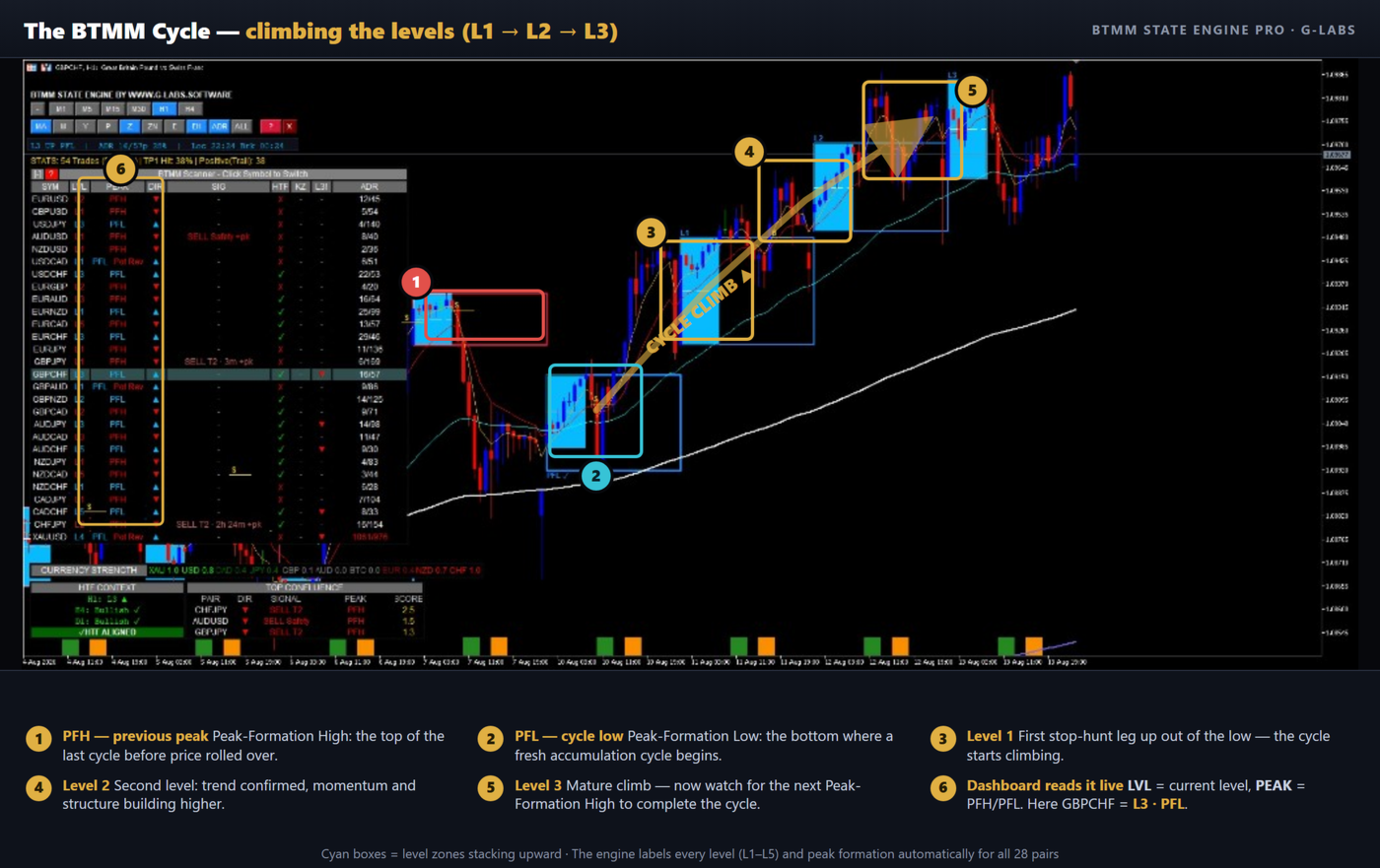
Btmm state engine pro combines session ranges, level progression and peak-formation analysis. Its multi-pair scanner and higher-timeframe context are analytical tools rather than automated execution.
The scanner depends on both symbol names and session alignment
The dashboard can show level, peak status, direction and timing context across a watchlist. Correct broker suffixes are therefore essential; an unavailable symbol can leave part of the analysis incomplete. Verify the Asian-range and London/New York windows with the selected automatic or manual server offset. A confluence ranking orders the tool’s observations, not the probability that a selected trade will succeed.
The tester demo does not reproduce the full scanner
The publisher states that the Market demo is limited to one symbol and timeframe and that scanner-driven functions will not display as in the full licence. Basic chart objects in a demo are therefore insufficient to validate multi-pair scanning. Review the publisher’s video and obtain clarification on the current build before buying solely for that feature. Pending and confirmed peak formations also represent different states and should not be counted interchangeably.
Before installation
Settings and setup requirements
These notes summarize the publisher material reviewed for Btmm state engine pro. Check the original manual and current release before configuring an account.
Suggested chart
M15 or H1
Symbol setup
Match scanner names to broker suffixes
Demo limitation
Publisher says multi-pair scanner is unavailable in the tester demo
Publisher profile status
The official listing marked publisher Garry James Goodchild as banned at review on September 22, 2026. Confirm current purchase, update and support availability directly with MQL5.
Publisher price at review
179 USD. Confirm current purchase and rental terms on MQL5.
Source evidence
Indicator examples and evidence
No direct public MQL5 account link was identified in the reviewed description. This does not establish that no monitoring exists. Publisher screenshots and backtests are not treated as independently verified live results.
What to assess before choosing Btmm state engine pro
Distinguish pending peak observations from confirmed formations in any historical review.
Third-party product research, not YO4X trading results. Past results do not establish future returns.
Publisher material
Btmm state engine pro images
Original publisher material. Embedded figures may describe a simulation or an earlier account snapshot; this is not a YO4X result.Original source ↗
Try before choosing
Btmm state engine pro: tester demo and licence options
MQL5 provides tester-only demonstrations for Market EAs and indicators. Open the original listing to check its demo option. An EA demo runs its trading logic in the Strategy Tester; an indicator demo is viewed in visual testing mode. This is different from receiving a free licence to run the full product on an online chart.
For Btmm state engine pro, use the setup notes above to identify what the tester can demonstrate and what still requires a supported account, data source or publisher guidance. Read MQL5’s product-testing rules ↗
Explore YO4X
Free local access. Clear product terms.
YO4X offers free local access to its supported strategy catalogue through the Windows app on supported MT5 demo accounts. This research page does not confirm that Btmm state engine pro is included or compatible.
A free full-product licence is not confirmed here for Btmm state engine pro. Check the publisher’s current purchase, rental or tester options on MQL5. YO4X does not distribute the publisher’s EX5 file from this page.
Ask support about current app availability before choosing a strategy. Arbitrary EX5 uploads are not supported; cloud execution and brokerage costs are separate.
Why does the demo show overlays but no working multi-pair scanner?
The publisher explicitly describes that limitation: its scanner needs several symbols and timeframes while the Market demo operates in a restricted testing context. Confirm the current full-version workflow using the linked listing and product video.
Can I assume current publisher support is available?
No. The reviewed MQL5 listing marked Garry James Goodchild’s publisher profile as banned. This guide does not establish the reason or duration. Confirm the current product availability, update route and support arrangements with MQL5 before purchasing.
Sources and editorial notes
Source review: 22 September 2026. This guide draws on the official product listing. A link does not mean we have reviewed the file contents. Where reviewed, the guide summarizes them with attribution.
YO4X Research is the site’s editorial attribution, not a certification or a named independent tester. We have not installed or forward-tested this product for this guide. Publisher claims, screenshots and source-account statistics do not establish that the current version reproduces those results. Artwork belongs to its original publisher.