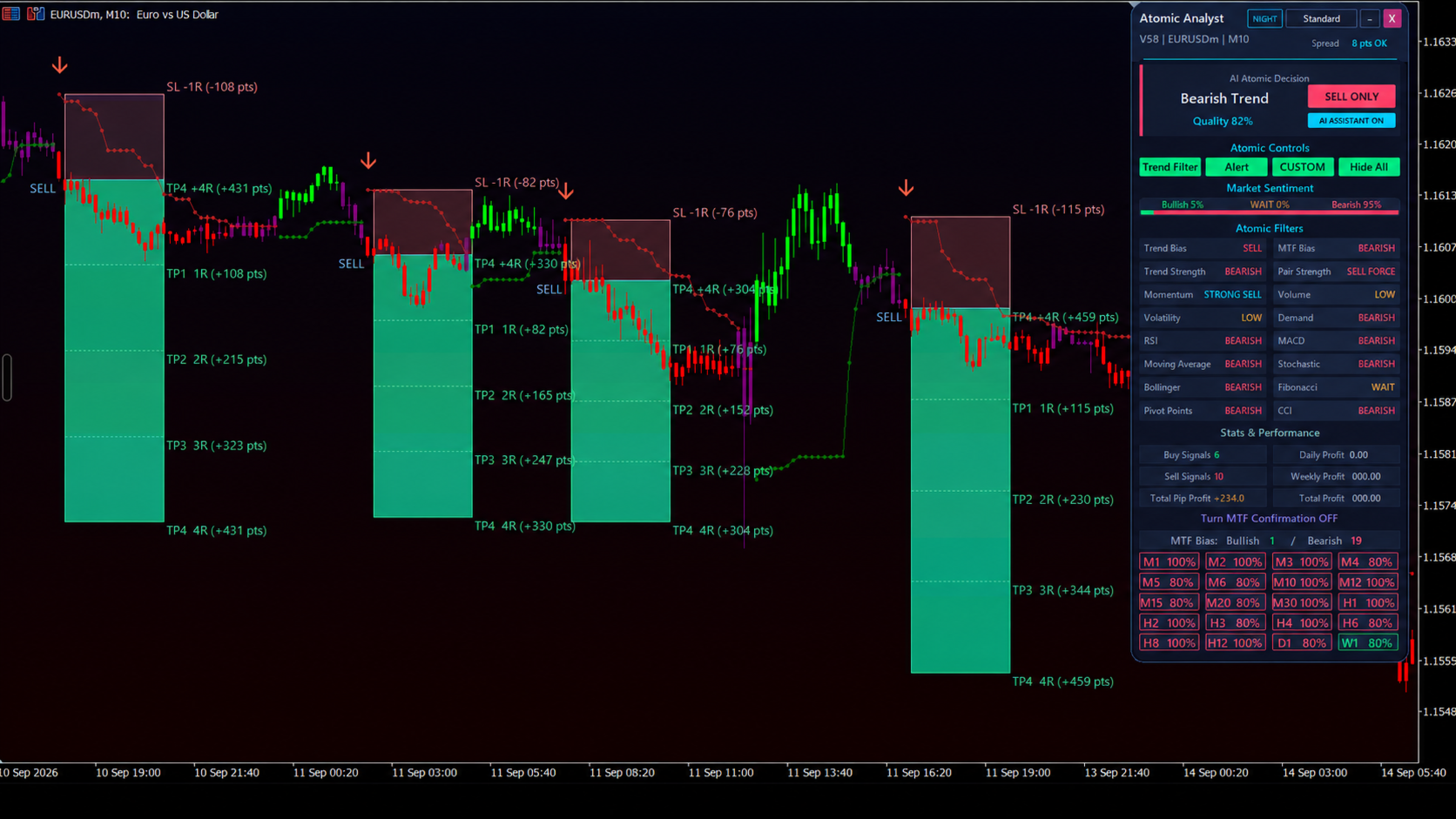
Atomic Analyst MT5 combines directional analysis with displayed entries, stops and several profit targets. The publisher offers a separate Smart Universal Expert Advisor for supported automation, so the indicator and execution component should be evaluated individually.
How Atomic Analyst MT5 is described by its publisher
The chart combines trend, momentum and strength readings with multi-timeframe context. A manual user can read these outputs without enabling automated orders. Automation requires configuring the companion EA connection and trade management; owning an indicator alone does not mean orders are being placed. The training package and community access are delivered through the publisher after purchase.
Using Atomic Analyst MT5 with clear rules
The distinction between analysis and execution is the most useful starting point for Atomic Analyst. A chart can display an entry arrow, a suggested stop and several profit levels without any order existing in the terminal. During installation, first confirm that the indicator renders consistently on the chosen H1 market; only then add the companion automation and inspect its journal. This makes it easier to identify whether a discrepancy comes from a signal calculation, a connector setting or broker execution.
Multiple targets require an allocation rule. Closing equal portions at each level produces a different outcome from closing the whole position at the first target or letting the final portion run. Record that policy before calculating a success rate. A buy arrow followed by contact with one target does not establish that the complete trade was profitable after later losses and costs.
The publisher’s manual and training are part of the offered package, not public evidence that every user applies the same settings. Preserve the lesson or configuration version used for an observation and request clarification when a demonstrated chart differs from the delivered defaults.
Before installation
Settings and setup requirements
These notes summarize the publisher material reviewed for Atomic Analyst MT5. Check the original manual and current release before configuring an account.
Publisher setup notes
H1 suggested starting chart; EURUSD, AUDUSD and XAUUSD are examples; companion EA requires separate connection settings.
Documentation
Check the original listing and contact the publisher for the current manual or presets. A purchase-only document is not reproduced here.
Publisher price at review
99 USD. Confirm current purchase and rental terms on MQL5.
Source evidence
Indicator examples and evidence
No direct public MQL5 account was identified in the reviewed listing. An indicator marks information or setups; its chart examples do not establish the returns of a complete trading system. Assess signal timing, repainting behaviour and the rules used to act on a signal.
What to assess before choosing Atomic Analyst MT5
Record a signal when it appears, then compare later chart history. Check whether the companion receives the same direction, stop and targets that the indicator displays.
Third-party product research, not YO4X trading results. Past results do not establish future returns.
Publisher material
Atomic Analyst MT5 images
Original publisher material. Embedded figures may describe a simulation or an earlier account snapshot; this is not a YO4X result.Original source ↗
Try before choosing
Atomic Analyst MT5: tester demo and licence options
MQL5 provides tester-only demonstrations for Market EAs and indicators. Open the original listing to check its demo option. An EA demo runs its trading logic in the Strategy Tester; an indicator demo is viewed in visual testing mode. This is different from receiving a free licence to run the full product on an online chart.
For Atomic Analyst MT5, use the setup notes above to identify what the tester can demonstrate and what still requires a supported account, data source or publisher guidance. Read MQL5’s product-testing rules ↗
Explore YO4X
Free local access. Clear product terms.
YO4X offers free local access to its supported strategy catalogue through the Windows app on supported MT5 demo accounts. This research page does not confirm that Atomic Analyst MT5 is included or compatible.
A free full-product licence is not confirmed here for Atomic Analyst MT5. Check the publisher’s current purchase, rental or tester options on MQL5. YO4X does not distribute the publisher’s EX5 file from this page.
Ask support about current app availability before choosing a strategy. Arbitrary EX5 uploads are not supported; cloud execution and brokerage costs are separate.
The listing describes an analysis indicator and a companion execution EA. Confirm which components are actually installed and enabled. Seeing an arrow and target on the chart establishes only that visual analysis is present. A demo order and its journal are needed to verify that the companion connection uses the intended size, symbol and management rules.
Can I download Atomic Analyst MT5 free through YO4X?
This page is product research and does not distribute the original Atomic Analyst MT5 file or confirm it is included in YO4X. Check the official MQL5 listing for current free, demo, rental or purchase options. YO4X’s free local access applies to its supported catalogue; ask support about this exact product.
Sources and editorial notes
Source review: 17 September 2026. This guide draws on the official product listing. A link does not mean we have reviewed the file contents. Where reviewed, the guide summarizes them with attribution.
YO4X Research is the site’s editorial attribution, not a certification or a named independent tester. We have not installed or forward-tested this product for this guide. Publisher claims, screenshots and source-account statistics do not establish that the current version reproduces those results. Artwork belongs to its original publisher.